> For the complete documentation index, see [llms.txt](https://docs.controlbee.nl/llms.txt). Markdown versions of documentation pages are available by appending `.md` to page URLs; this page is available as [Markdown](https://docs.controlbee.nl/de/readme.md).
# Dashboard
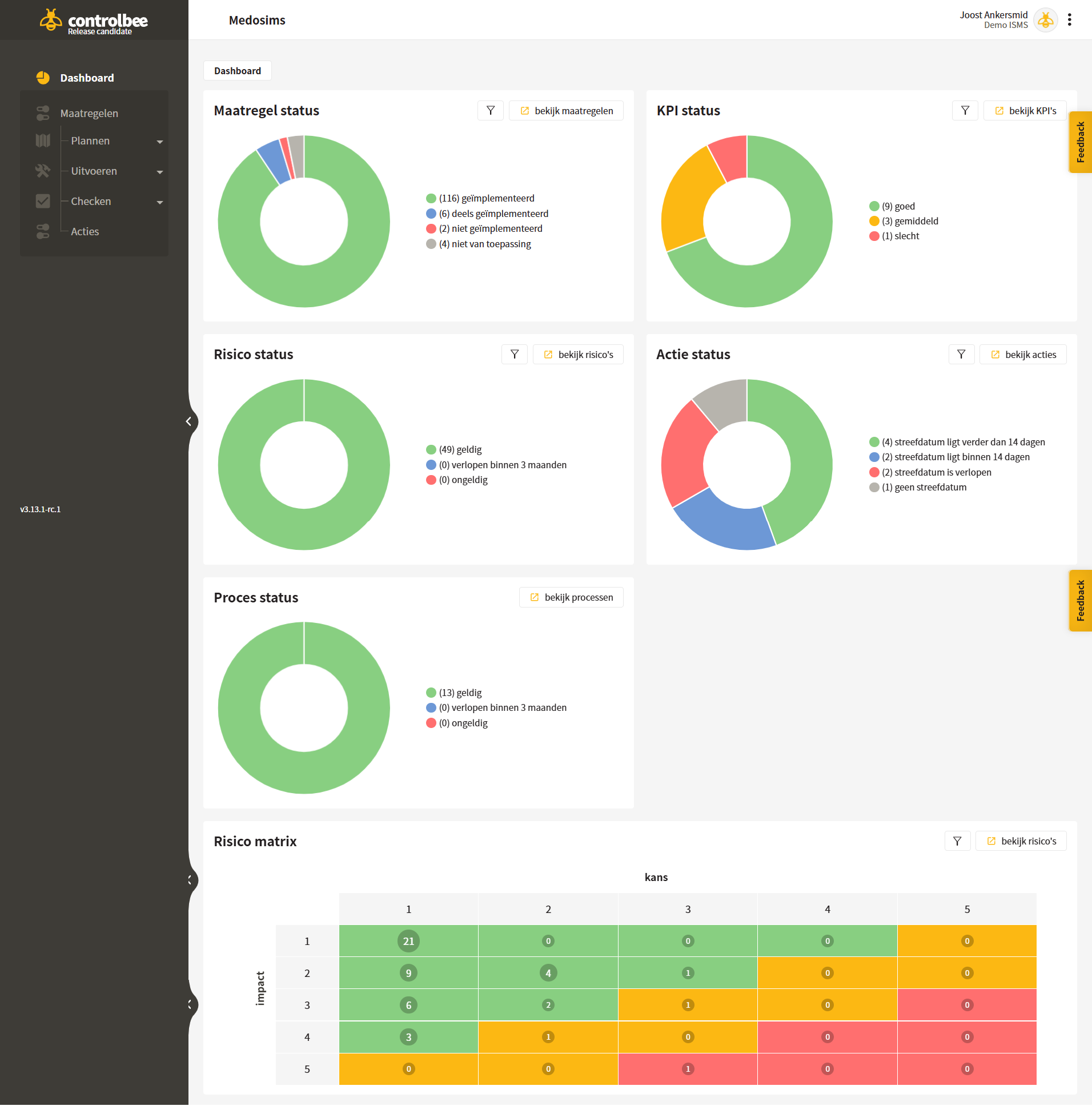
Das Dashboard gibt einen Überblick über die aktuellen Status der Maßnahmen, Prozesse, Risiken und Aktionen.
## Erklärung des Dashboards
* Die **Maßnahmenstatus** zeigt, inwieweit die Maßnahmen implementiert sind. Den Maßnahmenstatus kannst du optional anhand einer Quelle filtern, die mit den Maßnahmen verknüpft ist. Außerdem kann nach Labels gefiltert werden, die mit den Maßnahmen verknüpft sind.
* Die **KPI-Status** zeigt die zuletzt bekannten Scores der KPIs im Managementsystem an. Diese KPIs können pro Zielsetzung gefiltert werden.
* Die **Prozessstatus** betrifft, wie lange der Prozess noch gültig ist und wann der Prozess erneut auditiert werden muss.
* Die **Risikostatus** zeigt an, wann die Risiken bewertet werden müssen. Der Risikostatus kann anhand von Richtlinien, Risikoeigentümern und verknüpften Labels gefiltert werden.
* Die **Aktionsstatus** zeigt an, wie viele Aktionen noch offen sind und wie weit der Zieltermin noch in der Zukunft liegt. Außerdem kann der Aktionsstatus nach Aktionsverantwortlichen, den verknüpften Labels und nach Aktionstypen gefiltert werden.
* Die **Risikomatrix** macht deutlich, wo sich alle gültigen Risiken auf Basis von Wahrscheinlichkeit × Auswirkung befinden. Dadurch erhält die Organisation einen Überblick darüber, welchen Risiken sie noch ausgesetzt ist. Die Risiken in der Risikomatrix können außerdem anhand von Richtlinien, Risikoeigentümern und verknüpften Labels gefiltert werden.
{% hint style="info" %}
Das Dashboard und die Risikomatrix sind mit einer Drilldown-Funktion ausgestattet.
{% endhint %}
{% hint style="warning" %}
Achtung: Wenn im betreffenden Unternehmen mehrere Kontexte vorhanden sind, zeigt das Dashboard den Status aller offenen Aktionen über alle Kontexte hinweg an.
{% endhint %}
---
# Agent Instructions
This documentation is published with GitBook. GitBook is the documentation platform designed so that both humans and AI agents can read, navigate, and reason over technical content effectively. Learn more at gitbook.com.
## Querying This Documentation
If you need additional information that is not directly available in this page, you can query the documentation dynamically by asking a question.
Perform an HTTP GET request on the current page URL with the `ask` query parameter, and the optional `goal` query parameter:
```
GET https://docs.controlbee.nl/de/readme.md?ask=&goal=
```
`ask` is the immediate question: it should be specific, self-contained, and written in natural language.
`goal` is optional and describes the broader end goal you are ultimately trying to accomplish on behalf of the user. GitBook uses it to tailor the answer towards what is most useful for that goal.
The response will contain a direct answer to the question and relevant excerpts and sources from the documentation.
Use this mechanism when the answer is not explicitly present in the current page, you need clarification or additional context, or you want to retrieve related documentation sections.