> For the complete documentation index, see [llms.txt](https://docs.controlbee.nl/llms.txt). Markdown versions of documentation pages are available by appending `.md` to page URLs; this page is available as [Markdown](https://docs.controlbee.nl/readme.md).
# Dashboard
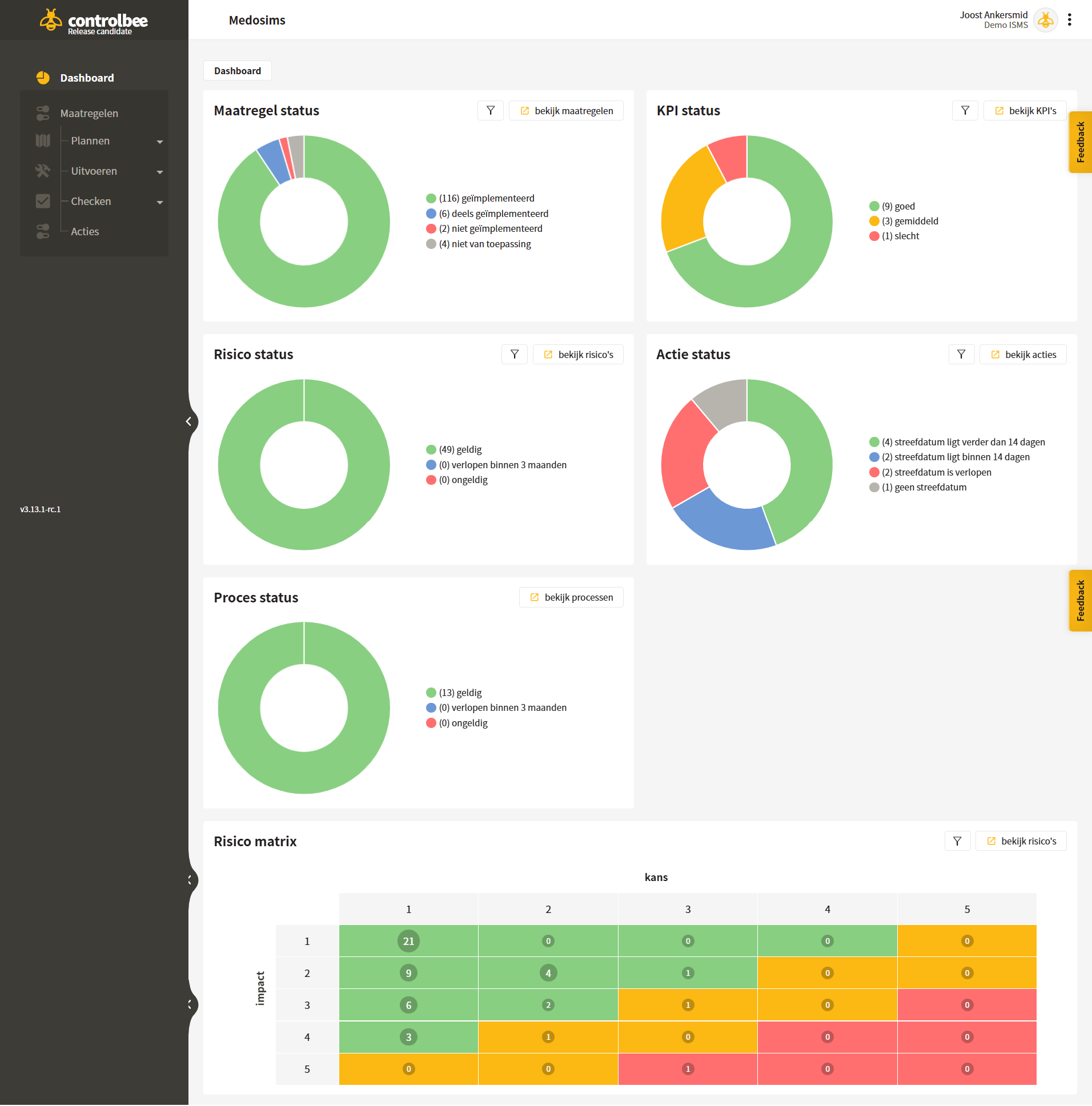
Het dashboard geeft een overzicht van de huidige statussen van de maatregelen, processen, risico's en acties.
## Uitleg dashboard
* De **maatregel status** laat zien in hoeverre de maatregelen zijn geïmplementeerd. De maatregel status kun je eventueel filteren aan de hand van een bron die gekoppeld is aan de maatregelen. Daarnaast kan gefilterd worden op labels die gekoppeld zijn aan de maatregelen.
* De **KPI status** geeft de laatst bekende scores weer van de KPI's in het managementsysteem. Deze KPI's kunnen per doelstelling worden gefilterd.
* De **proces status** gaat over hoe lang het proces nog geldig is en wanneer het proces weer geaudit moet worden.
* De **risico status** toont aan wanneer de risico's geëvalueerd moeten worden. De risico status kan gefilterd worden aan de hand van beleid, risico-eigenaren en gekoppelde labels.
* De **actie status** geeft weer hoeveel acties er openstaan en hoe ver de streefdatum nog in de toekomst ligt. Daarnaast kan de actie status gefilterd worden op actienemers, de gekoppelde labels en op actietypen.
* De **risico matrix** maakt inzichtelijk waar alle geldige risico's zich bevinden op basis van kans × impact. Hierdoor krijgt de organisatie inzicht in welke risico's het nog loopt. De risico's in de risico matrix kunnen tevens gefilterd worden op beleid, risico-eigenaren en gekoppelde labels.
{% hint style="info" %}
Het dashboard en de risicomatrix zijn voorzien van een doorklikfunctie.
{% endhint %}
{% hint style="warning" %}
Let op: als er meerdere contexten aanwezig zijn in het betreffende bedrijf, geeft het dashboard de status van alle openstaande acties weer over alle contexten heen.
{% endhint %}
---
# Agent Instructions
This documentation is published with GitBook. GitBook is the documentation platform designed so that both humans and AI agents can read, navigate, and reason over technical content effectively. Learn more at gitbook.com.
## Querying This Documentation
If you need additional information that is not directly available in this page, you can query the documentation dynamically by asking a question.
Perform an HTTP GET request on the current page URL with the `ask` query parameter, and the optional `goal` query parameter:
```
GET https://docs.controlbee.nl/readme.md?ask=&goal=
```
`ask` is the immediate question: it should be specific, self-contained, and written in natural language.
`goal` is optional and describes the broader end goal you are ultimately trying to accomplish on behalf of the user. GitBook uses it to tailor the answer towards what is most useful for that goal.
The response will contain a direct answer to the question and relevant excerpts and sources from the documentation.
Use this mechanism when the answer is not explicitly present in the current page, you need clarification or additional context, or you want to retrieve related documentation sections.